You have signed the lease, ordered the furniture and hired your first team. Now comes the part nobody puts on the launch poster: making sure everyone can actually get online. A badly planned office network shows up in daily frustrations such as frozen video calls, slow shared drives, vanishing printers and a Wi-Fi password that every visitor seems to know. Left alone, those problems become lost productivity and, worse, security gaps.
This office network setup checklist is written for new businesses in India: startups, agencies, clinics, CA firms, small manufacturers and branch offices. It covers planning, internet, cabling, hardware, Wi-Fi, security, power backup and the Indian regulations that quietly apply from day one. Work through it in order and you will end up with a network that is fast, safe, documented and ready to grow.
The 12-Step Office Network Setup Checklist at a Glance
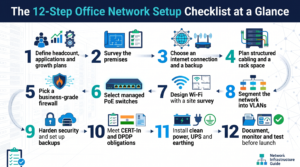
- Define headcount, applications and growth plans
- Survey the premises
- Choose an internet connection and a backup
- Plan structured cabling and a rack space
- Pick a business-grade firewall
- Select managed PoE switches
- Design Wi-Fi with a site survey
- Segment the network into VLANs
- Harden security and set up backups
- Meet CERT-In and DPDP obligations
- Install clean power, UPS and earthing
- Document, monitor and test before launch
Step 1: Plan Before You Buy
The costliest network mistakes are made on paper, not in the rack. Before talking to vendors, answer four questions.
How many people and devices? Count employees, then multiply. Each person brings a laptop and phone, and the office adds printers, CCTV, biometric machines and IP phones. A 25-person office can easily have 100 connected devices.
What do you run? A team on Google Workspace, Microsoft 365 or a cloud CRM has different needs from a design studio moving large files. Video calls and VoIP are especially sensitive to unstable links.
What is your growth plan? Design for roughly double your headcount over two to three years. Cabling is the hardest thing to change later, so over-provision it and keep the electronics modest.
What is your budget? Many small offices split spending roughly into thirds: connectivity, cabling and installation, and firewall, switches and Wi-Fi. Treat that as a starting point and collect at least three written quotes.
Step 2: Survey the Premises
Walk the space with a floor plan, ideally with your installer. Note where fibre enters the building, where the electrical panel sits and where a small rack can go.
- Building permissions. In many commercial buildings and IT parks, ISPs need written permission from the landlord to lay fibre and use risers. Sort this out early, as it can delay go-live by weeks.
- Wall and ceiling type. False ceilings are easy to cable; RCC walls need conduits.
- Number of drops. Plan one data point per desk, plus meeting rooms, reception, printers, access points, cameras and spares.
- Heat and ventilation. A cupboard with no airflow in a Delhi or Chennai summer means random reboots.
Step 3: Choose Your Internet Connection and a Backup
For most businesses, internet is the most important utility after electricity. Do not settle for a home plan with a business label.
Leased line vs business broadband
An Internet Leased Line (ILL) is a dedicated connection with symmetric upload and download speeds, usually bundled with static IPs and a contractual uptime commitment. Business broadband is shared with other customers, often faster on download than upload, and typically has no firm uptime guarantee.
- Choose a leased line if you depend on cloud ERP, VoIP or video-heavy work, host anything internally, or lose real money for every hour offline.
- Choose business broadband if you are a team of roughly 10 to 15 using mainly web apps, and you add a backup link.
Leased lines in India typically range from 10 Mbps up to several Gbps, so you can start small and upgrade. Providers include Airtel, Tata Tele Business Services, BSNL, Sify and ACT, plus regional ISPs. Availability varies by building, so ask who already has fibre at your address.
What to ask every ISP
- Is the bandwidth dedicated or shared?
- What is the written uptime SLA, and what happens if it is missed?
- What is the fault-resolution time, and is support 24×7?
- How many static public IPs are included?
- Is there a redundant path option?
- What are the lock-in period, installation charges and upgrade terms?
Watch out for shared public IPs
Many consumer and some business broadband plans place customers behind carrier-grade NAT, which means you do not get a public IP of your own. That breaks site-to-site VPNs, remote access to CCTV and any service you host. If you need inbound access, insist in writing on a dedicated static IP, and check the monthly charge for it before you sign, because some ISPs bill it separately.
Always have a backup link
Even the best ISP has outages, and a fibre cut during road work is a classic. The ideal backup is a second ISP on a physically different route. A cheaper option is a 4G or 5G failover router with a data SIM. Your firewall should switch automatically so nobody touches a cable.
Step 4: Structured Cabling and the Network Rack
Wi-Fi gets the attention, but a wired backbone is what makes the network reliable.
- Use Cat6 as a minimum. It handles gigabit speeds comfortably. Choose Cat6A if you expect heavy use.
- Use fibre between floors or buildings.
- Respect the 90-metre limit for permanent copper runs.
- Terminate on patch panels, never straight into a switch.
- Label every outlet, cable and port, and keep the map.
- Keep data and power cables apart to avoid interference.
- Choose a proper rack. A 9U to 12U wall or floor rack with cable managers suits most small offices.
- Keep it cool, dry and lockable.
Step 5: Firewall and Router
Skip the consumer router. A business-grade firewall (often called a UTM or next-generation firewall) is the front door of your network. Look for:
- Stateful inspection, intrusion prevention and web filtering
- VPN support for remote staff
- Multi-WAN with automatic failover
- VLAN support and guest network controls
- Central logging, which matters for Indian compliance (see Step 10)
- Vendor support and replacement available in India
Brands such as Fortinet, Sophos, Palo Alto Networks, SonicWall, Cisco Meraki and MikroTik all have local partners. Choose based on your team’s skills and partner support, not only the spec sheet. A firewall nobody can configure properly is just an expensive box.
Step 6: Switches and Power over Ethernet
Choose managed switches so you can create VLANs, monitor ports and troubleshoot.
- Port count. Total your wired devices and add about 30 percent spare.
- PoE or PoE+. Power over Ethernet runs access points, cameras and IP phones through one cable. Check the total PoE power budget, not only port count.
- Uplinks. Choose 10G SFP+ uplinks if traffic between floors or to servers will be heavy.
- Warranty. Look for multi-year cover with advance replacement.
Step 7: Plan Wi-Fi Properly
A single router in a corner cannot cover a modern office. Good Wi-Fi comes from several ceiling-mounted access points (APs) managed centrally.
- Do a site survey. Even a basic one shows where walls, glass partitions and lifts block signal.
- Mount APs on ceilings. As a rough guide, plan one per 1,500 to 2,500 square feet of open space, and more for dense meeting rooms.
- Choose the standard. Wi-Fi 6 is a safe baseline. Wi-Fi 6E and Wi-Fi 7 add the 6 GHz band for cleaner channels.
- Know the Indian 6 GHz position. India has moved to delicense the lower 6 GHz band (5925 to 6425 MHz) for low-power indoor use, opening the door to Wi-Fi 6E and Wi-Fi 7. Rules and device approvals are still evolving, so buy equipment certified for India and confirm 6 GHz operation with your vendor.
- Separate staff and guest SSIDs. Guests should reach the internet only.
- Use WPA3 or WPA2-Enterprise. Individual credentials let you remove a departing employee in seconds, unlike one shared password.
- Use a controller for one dashboard across all APs.
Step 8: Segment the Network with VLANs
A flat network is convenient and dangerous. A compromised printer or camera can become a stepping stone to your finance data. Create separate VLANs for staff devices, servers, guests, IP phones, CCTV and IoT (cameras, biometric machines, smart displays) and management interfaces. Then write firewall rules so that, for example, cameras can talk to their recorder and nothing else.
Plan special devices early. IP phones need prioritised traffic (QoS), CCTV generates constant data and needs sized storage and uplinks, and biometric systems should sit on a restricted VLAN.
Step 9: Network Security Essentials
Small businesses are attractive targets precisely because they assume nobody would bother. Build in these basics from day one.
- Change all default passwords on routers, APs, cameras and printers.
- Enable multi-factor authentication on email, cloud tools, VPN and admin consoles.
- Patch monthly, and apply critical fixes as soon as they are released.
- Use managed endpoint protection, not free consumer antivirus.
- Use a VPN or zero-trust access for remote work. Never expose remote desktop to the internet.
- Follow the 3-2-1 backup rule: three copies, two media types, one off-site. Test restores quarterly.
- Limit admin rights to one or two trusted people.
- Train your team. Phishing remains the most common way in.
Step 10: Indian Compliance You Should Not Ignore
This is the section most generic checklists miss.
CERT-In directions
The Indian Computer Emergency Response Team (CERT-In) issued directions in April 2022 under the IT Act. For most organisations, the key obligations are:
- Report specified cyber incidents within six hours of noticing them, including data breaches and ransomware. Name a contact person and keep a simple written response plan.
- Keep logs of ICT systems for a rolling 180 days, stored within India, and protect them from tampering.
- Synchronise system clocks with trusted sources such as the NTP servers run by NIC or NPL, so logs line up during investigations.
In practice, choose a firewall that logs properly, set up central log storage in India (a small syslog server or an India-hosted cloud region works) and write down who calls whom when something goes wrong. Details can vary by sector, so confirm with a qualified adviser.
Digital Personal Data Protection (DPDP) Act
The DPDP Rules were notified in November 2025, with full obligations generally expected around May 2027. The government has signalled it may shorten that window, so early preparation is wise. For your network, that means reasonable safeguards: encryption, access controls, logging, backups and a breach-notification plan. Build them in now rather than retrofitting.
Sector rules and licensing
Banking, NBFCs, insurance, healthcare and brokerage may face extra regulator requirements. Keep all software properly licensed, retain GST invoices for hardware to claim eligible input tax credit and file warranty papers together.
Step 11: Power, UPS and Earthing
Voltage fluctuations and outages are a leading cause of hardware failure in Indian offices.
- Install online UPS units for the rack and critical devices, sized for at least 30 to 60 minutes for core network gear.
- Plan for longer outages with a generator or inverter that covers the network, not just the lights.
- Insist on proper earthing, and get the earth resistance tested and recorded. Poor earthing quietly burns ports and switches.
- Add surge protection where data lines enter the building, especially in lightning-prone areas.
- Put the ISP’s equipment on UPS too. Many offices protect their own gear and still lose internet because the ISP device went dark.
Step 12: Document, Monitor and Test
A network without documentation is a hostage situation waiting to happen the day your IT person leaves.
Document the network diagram, IP and VLAN plan, device inventory with serial numbers and warranty dates, ISP escalation contacts and firewall rules. Store admin credentials in a password manager.
Monitor uptime, bandwidth and device health with a free or low-cost tool and alerts to email or WhatsApp. Review utilisation monthly so you upgrade before users complain.
Test before launch day:
- Speed test at several desks and every meeting room
- Failover test by unplugging the primary link
- UPS test by cutting mains power
- Guest Wi-Fi isolation check
- Restore a file from backup
- Confirm logs are arriving and clocks are synchronised
Common Mistakes to Avoid
The usual culprits are buying consumer gear for business use, skimping on cabling (re-cabling later costs several times more), relying on a single ISP, running one flat network, ignoring power and earthing, leaving compliance until an audit, skipping documentation and choosing purely on price. The cheapest quote often leaves out installation, SLA or support.
Frequently Asked Questions
How much bandwidth does a small office in India need?
A useful starting point is 2 to 3 Mbps per active user for general work, and more for heavy video or large uploads. A 20-person team often does well with 100 Mbps dedicated. Choose a plan you can upgrade without a long lock-in.
Is a leased line worth it for a startup?
If your revenue depends on the internet, as with customer support, trading, cloud software or video production, usually yes. Very small teams on web tools can start with business broadband plus a 4G or 5G backup and move up as they grow.
Do I need a static IP address?
You need one if you host anything, run VPNs, use IP allow-listing with banks or vendors, or view CCTV remotely. Most business plans include at least one.
Do CERT-In rules apply to small businesses?
The directions apply broadly to service providers, intermediaries, data centres, body corporates and government organisations. Most registered businesses should assume the incident-reporting and logging expectations apply, and seek professional advice on how they fit.